
Can a Power Station Replace a UPS? The 20-Millisecond Problem
The lights flicker. Your power station detects the outage and switches to battery mode. Your router stays online. Your monitor is fine. But your desktop PC — the one running unsaved work — reboots anyway.
Welcome to the 20-millisecond problem. Power stations market "UPS mode" or "EPS mode" as seamless backup, but the switchover window is 2-3× longer than what most desktop computers can tolerate. Understanding this gap determines whether you need a true UPS, a power station, or both.
The Reboot Window: Switchover Time Explained
How True UPS Systems Work
A traditional uninterruptible power supply (UPS) uses one of three topologies:
Online/double-conversion UPS: Your devices always run on battery power, with wall current constantly recharging. Switchover time is 0ms because there's no switch — the battery is already powering everything. Used in data centers and medical equipment.
Line-interactive UPS: Wall power feeds devices directly, with the battery on standby. When an outage occurs, an automatic transfer switch engages in under 10 milliseconds — well within the hold-up time of modern ATX power supplies (typically 16-20ms).
Standby/offline UPS: Similar to line-interactive but slower. Switchover in 10-15ms. Budget consumer units.
The critical specification: hold-up time is the duration a power supply's internal capacitors can sustain output after wall AC disappears. Most desktop PSUs hold for 16-20ms. Some server-grade units reach 30ms. Laptops have internal batteries, so they're immune.
How Power Station "UPS Mode" Works
Power stations operate as standby topology devices. When plugged into wall power:
- AC passes through to your devices
- Surplus current charges the battery
- An automatic transfer switch monitors input voltage
- On outage detection, the switch disconnects from grid and engages the inverter
Manufacturers advertise this as "UPS mode" (EcoFlow) or "EPS mode" (Bluetti). The switchover time is typically 20-30 milliseconds — sometimes faster, often slower, and rarely specified in published specs.
Why Marketing Calls It UPS Mode Anyway
The feature provides uninterruptible power in the literal sense: the device continues outputting AC. But it doesn't meet the sub-10ms standard that defines UPS performance for sensitive electronics.
For many devices, 20-30ms is perfectly adequate:
- Wi-Fi routers and modems: Internal capacitors or small batteries handle gaps up to 50ms
- Laptops: Internal battery seamlessly bridges any gap
- CPAP machines: Motor and blower tolerate brief interruptions; may cause minor pressure fluctuations during ramp-up
- LED lighting and fans: No issue
Devices that often fail with 20-30ms gaps:
- Desktop PCs with budget PSUs: Many consumer-grade ATX supplies drop below hold-up voltage at 12-16ms
- NAS systems: Some units trigger emergency shutdown protocols on brief power loss
- High-end audio/video equipment: May mute, reboot, or trigger protection circuits
- Medical devices requiring continuous power: Check manufacturer specifications
The Real-World Test Nobody Publishes
Manufacturers rarely publish verified switchover times for power stations. EcoFlow's documentation mentions "less than 30ms" for some Delta models. Anker doesn't specify. Bluetti states "20ms" for certain units but doesn't clarify test conditions.
Without a storage oscilloscope and resistive load bank, you won't know your specific unit's performance until the first outage — when it's too late.
When Each Solution Wins
Traditional UPS: The 5-Minute Shutdown Window
Pros
- Guaranteed sub-10ms switchover for desktop PCs and NAS
- Clean sine wave output (on pure sine models)
- Battery replacement cycles keep upfront cost low
- Desktop/tower models fit under desks, out of sight
Cons
- Runtime typically 5-15 minutes at full load
- Lead-acid batteries degrade in 3-5 years
- No solar recharge option
- Limited to stationary use
- Alarm beeps can't always be disabled
Best for: Desktop PC, home server, NAS, cable modem + router combo where you need 5-15 minutes to save work and execute a clean shutdown. Not for extended outages.
Power Station: The Multi-Hour (or Multi-Day) Backup
Pros
- Runtime measured in hours or days, not minutes
- LiFePO4 chemistry: 3000-6000 cycle lifespan
- Solar recharging for off-grid or extended outages
- Portable: use for camping, job sites, emergency evacuation
- Powers high-draw devices (refrigerators, power tools, heaters)
Cons
- Switchover typically 20-30ms — too slow for many desktops
- Higher upfront cost ($600-$3000+)
- Heavier (25-115 lbs for 1-4 kWh models)
- Pass-through charging generates heat, may reduce cycle life
Best for: Whole-desk backup including monitors, external drives, lighting, phone chargers, and devices that tolerate brief switchover gaps. Extended outage preparedness. Dual use for camping or outdoor work.
The Hybrid Setup: Belt and Suspenders
The optimal configuration for critical work-from-home or small office setups:
Wall → UPS → desktop PC + NAS
5-15 minutes of guaranteed sub-10ms switchover. Enough time for automatic shutdown scripts or manual save-and-hibernate.
Wall → power station → everything else
Router, modem, monitors, USB hub, desk lamp, phone chargers. Devices that tolerate 20-30ms gaps and benefit from extended runtime.
During an outage:
- UPS keeps critical gear alive instantly
- Power station keeps connectivity and workspace functional for hours
- You have time to either finish work on battery or execute clean shutdowns
- If outage exceeds UPS runtime (10-15 min), the PC shuts down safely while everything else continues
Bonus: Plug the UPS into the power station. When grid fails, the power station feeds the UPS, which continues feeding the PC. The UPS bridges the 20-30ms gap during the initial switchover, then runs on power-station AC for as long as capacity allows.
This stacks switchover events (grid → power station, power station → UPS battery if the station's output wavers), but in practice the UPS treats the power station as a new wall source and simply passes current through.
Power Stations with Best Switchover Performance
Verified switchover specifications are rare. Here's what manufacturers publish and what to verify before purchase:
| Spec | Anker SOLIX C1000 Gen 2 | EcoFlow Delta Pro 3 | Bluetti Apex 300 | EcoFlow Delta 2 |
|---|---|---|---|---|
| Capacity | 1024 Wh | 4096 Wh | 2764 Wh | 1024 Wh |
| Continuous Output | 2000 W | 4000 W | 3840 W | 1800 W |
| Surge Output | 3000 W | 8000 W | 7680 W | 2700 W |
| Weight | 24.9 lbs | 113.5 lbs | 81.6 lbs | 27 lbs |
| Battery Chemistry | LiFePO4 | LiFePO4 | LiFePO4 | LiFePO4 |
| Cycle Life | 4000 cycles | 4000 cycles | 6000 cycles | 3000 cycles |
| Recharge Time | 49 min | 60 min | 90 min | 80 min |
| Max Solar Input | 600 W | 2600 W | 2400 W | 500 W |
| Outlets | 6 AC · 1 Car · 2 USB-A · 2 USB-C | — | — | — |
What the Specs Tell Us (and Don't)
EcoFlow Delta series: Documentation states "UPS mode" with switchover "less than 30ms" for Delta 2 and Delta Pro 3. No official spec on whether this is typical, maximum, or measured at specific loads.
Anker SOLIX C1000: Marketing materials mention "UPS function" but do not publish switchover time. The pass-through charging feature is confirmed, but assume 20-30ms unless verified.
Bluetti Apex 300: Some Bluetti models claim "20ms UPS switching" in spec sheets, but the Apex line doesn't publish this metric on the official product page as of mid-2026.
The Verification Checklist
Before relying on a power station as your sole UPS replacement:
- Check the official spec sheet PDF: Look for "transfer time," "switchover time," or "UPS response time"
- Search for third-party oscilloscope tests: Some reviewers measure actual switchover with test equipment
- Test with your actual hardware: Connect your desktop, simulate an outage by unplugging the power station from the wall
- Have a backup plan: Keep work saved, enable auto-save in critical apps, or use the hybrid UPS setup
If the manufacturer doesn't publish switchover time, assume it's 20-30ms and plan accordingly.
Pass-Through Charging: The Hidden Trade-Off
All four models here support pass-through charging (also called "bypass mode" or "AC charging while in use"). This allows simultaneous charging and discharging — essential for UPS-style operation.
The heat problem: Charging generates heat. Discharging generates heat. Doing both simultaneously, especially at high wattage, stresses the battery management system and can shorten cycle life. LiFePO4 chemistry tolerates this better than older lithium-ion, but sustained pass-through use at high loads (>50% of rated output) may reduce the 3000-6000 cycle lifespan by 10-20%.
Practical impact: If you're using a power station as a daily UPS for a home office drawing 200-400W, you're well within safe thermal limits. If you're pulling 1500W+ continuously while also fast-charging, expect accelerated aging.
FAQ
Will my desktop PC survive a 20-30ms switchover?
It depends on your power supply. Most modern ATX power supplies specify 16-20ms hold-up time at full load, less at partial load. Budget PSUs may drop to 10-12ms. Server-grade or high-efficiency (80+ Titanium) units often reach 25-30ms.
How to check: Look up your PSU model's hold-up time in professional reviews (Tom's Hardware, AnandTech, Cybenetics). If unavailable, assume 16ms for consumer units. A 20-30ms switchover will likely cause a reboot.
The safe bet: Use a true UPS for desktop PCs, or test your specific hardware with a simulated outage before relying on a power station alone.
Is EPS mode the same as UPS mode?
Yes, different branding for the same feature. EcoFlow calls it "UPS mode." Bluetti calls it "EPS" (Emergency Power Supply). Jackery and Anker use "UPS function" or "pass-through charging."
All describe a pass-through topology where grid power feeds devices directly until an outage triggers automatic switchover to battery/inverter output. The switchover time (typically 20-30ms) is what matters, not the marketing term.
Neither term guarantees sub-10ms performance like a traditional line-interactive or online UPS.
Can I run a NAS on a power station during an outage?
Yes, but test first. Most NAS units tolerate 20-30ms gaps without triggering emergency shutdown, but behavior varies by model and configuration:
- Synology, QNAP consumer NAS: Generally handle brief power interruptions; may log an error but continue operating
- Enterprise NAS or SAN: Often more sensitive; may enter safe mode or halt I/O
- NAS with spinning HDDs under heavy write load: Higher risk of filesystem corruption if power drops mid-write
Best practice: Use a traditional UPS between the power station and NAS for the initial switchover, or enable UPS integration in your NAS OS to trigger graceful shutdown when the power station's battery hits 20%.
Does pass-through charging degrade the battery faster?
Yes, but the impact is manageable with LiFePO4 chemistry. Simultaneous charge/discharge generates heat, and heat is the primary enemy of lithium battery longevity.
Thermal impact:
- Below 30% of rated output: Negligible impact on cycle life
- At 30-60% output: 5-10% reduction in total cycles over lifespan
- At >60% output with fast charging: 10-20% reduction
Mitigation:
- Ensure adequate ventilation around the unit
- Avoid sustained high-wattage pass-through use in hot environments (>85°F)
- If possible, use the power station in "charging only" mode when not needed for backup
The four models listed all use LiFePO4 (lithium iron phosphate), which tolerates heat and charge/discharge cycles better than standard lithium-ion. A 10% reduction on a 4000-cycle battery still yields 3600 cycles — roughly 10 years of daily use.
Can I plug a UPS into a power station?
Yes, and it's the best hybrid approach for desktop PCs. The setup:
- Wall outlet → power station (in pass-through/UPS mode)
- Power station AC outlet → UPS input
- UPS output → desktop PC, NAS, or other sensitive gear
How it works during an outage:
- Grid fails
- Power station switches to battery in 20-30ms
- UPS detects the brief gap and switches to its battery in under 10ms
- Your PC never loses power
- After the UPS confirms stable input from the power station, it switches back to pass-through and its battery recharges
Runtime: The UPS draws power from the power station, so runtime is limited only by the station's capacity (hours or days) rather than the UPS's small internal battery (minutes).
Caveats:
- Some UPS units may alarm or log errors during the initial 20-30ms gap, even if they successfully bridge it
- Ensure the power station's output wattage exceeds the UPS's input draw (usually negligible unless the UPS is powering high-wattage devices)
- Stacking multiple conversion stages (AC→DC in power station, DC→AC out, AC→DC in UPS, DC→AC out) introduces minor efficiency loss (~5-10%)
This configuration gives you sub-10ms switchover and extended runtime. It's overkill for most users, but essential for anyone running business-critical servers or workstations from home.
Which Should You Buy?
If you need to protect a single desktop PC or NAS for clean shutdown: Buy a traditional line-interactive UPS rated for 10-15 minutes at your device's wattage. Cost: $100-$300. CyberPower and APC dominate this category. You don't need a power station.
If you want whole-desk backup for work-from-home with extended outages (2-8 hours) and your desktop can tolerate a reboot: The Anker SOLIX C1000 Gen 2 (currently $449.99) offers the best balance of capacity (1024Wh), output (2000W), and recharge speed (49 minutes). Run your router, modem, monitors, and lighting. Accept that your desktop may reboot unless you test it first.
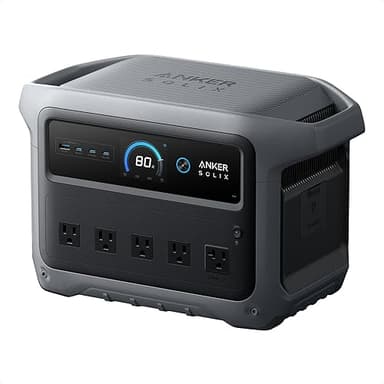
If you need whole-desk backup and your PC must never reboot: Use the hybrid setup. A $150 line-interactive UPS dedicated to your PC and NAS, plus the Anker SOLIX C1000 Gen 2 (currently $449.99) for everything else. Optionally plug the UPS into the power station for extended UPS runtime.
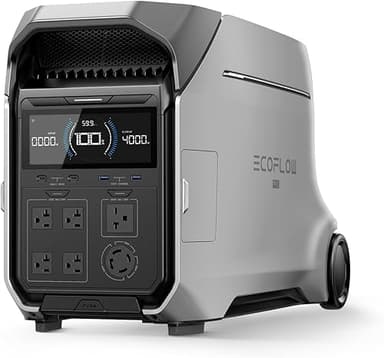
If you're planning whole-home backup or off-grid use beyond a desk: The EcoFlow Delta Pro 3 (currently $2599.00) scales to 4096Wh with 4000W output, enough for refrigerators, well pumps, and medical equipment. Pair with solar panels for multi-day outages. Still recommend a separate UPS for desktop computers and network equipment.
Bottom line: A power station can replace a UPS for many devices, but not for desktop PCs and NAS systems unless you verify switchover time or stack a true UPS in front of critical gear. For extended outages, a power station wins. For the 20-millisecond gap, a traditional UPS remains undefeated.